
DocumentsSync, organize and process files.
DOCUMENTS, AI AND DAILY WORK IN ONE APPLICATION
Manage files, read documents with AI, schedule clients and track work from one place.
SyncSpace is built for the work that usually gets split between cloud drives, email attachments, AI chat, calendars and ticketing tools. Upload or synchronize a document, process it with OCR or TailorBOT, use the extracted information, schedule the next action and keep the request assigned to the right person.
✓ Files synchronized across Windows, web and Android
✓ OCR and TailorBOT directly on selected documents
✓ Calendar and ticketing connected to the same workspace
OCR + TailorBOTRead selected documents and extract answers.
Client calendarSchedule meetings and confirmations.
TicketsAssign and track the work that follows.
SEE THE ACTUAL PRODUCT
What you can actually do in SyncSpace
Instead of describing SyncSpace with generic words, here is the actual flow: work with a document, let AI read it, ask questions, use the answer, schedule customer activity and turn follow-up work into an assigned ticket.
01
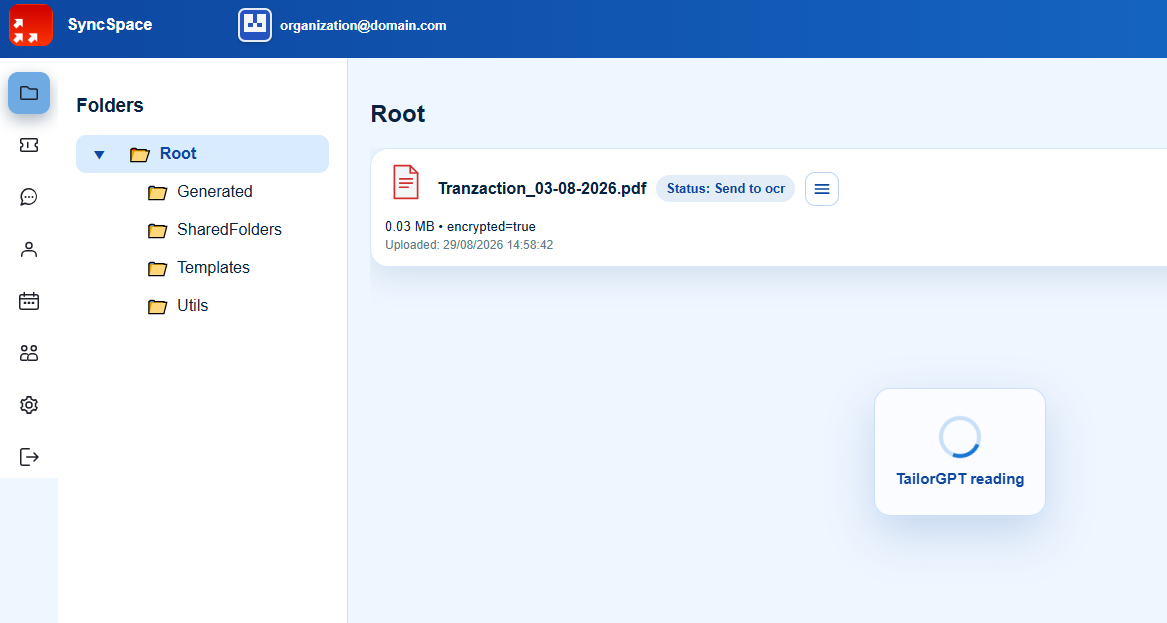
Keep company documents in a structured file area
Use folders for generated files, shared documents, templates and internal utilities. Files can be synchronized from Windows or uploaded in the web application, so the same document structure is available to authorized users.
From the file list you can see processing status and start document actions without moving the file into another application.
02
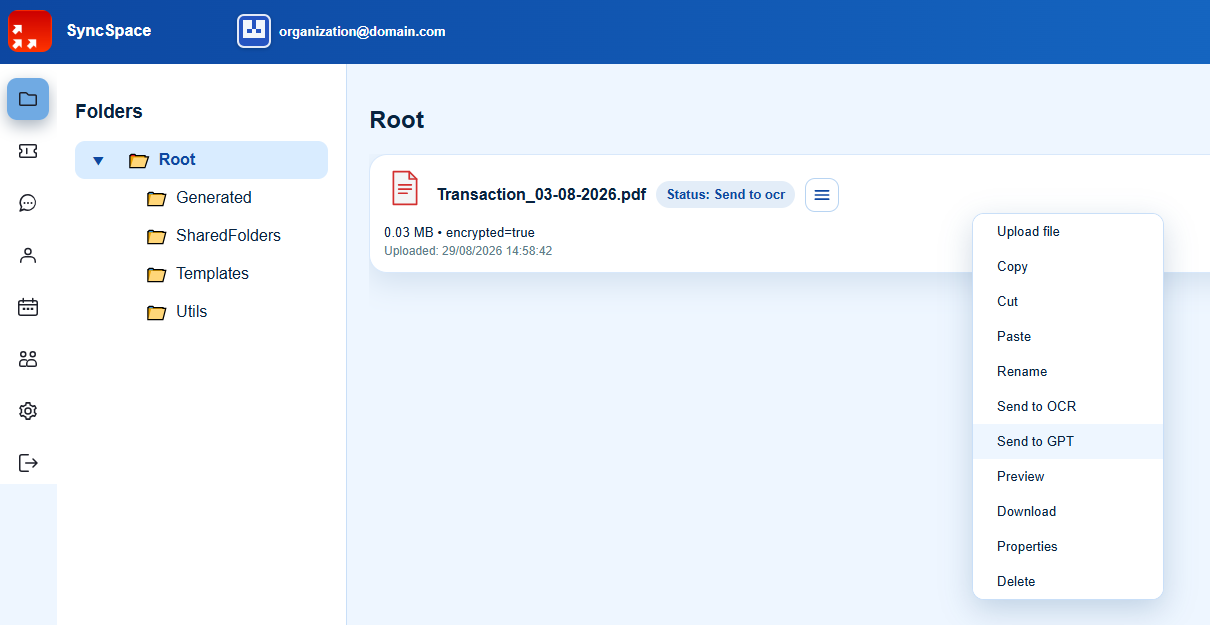
Send a document to OCR or TailorBOT from its file menu
Open the actions menu on a file and choose what should happen next: send it to OCR, send it to GPT, preview it, download it, rename it or manage its properties. The document stays in the same controlled workspace while it is processed.
03
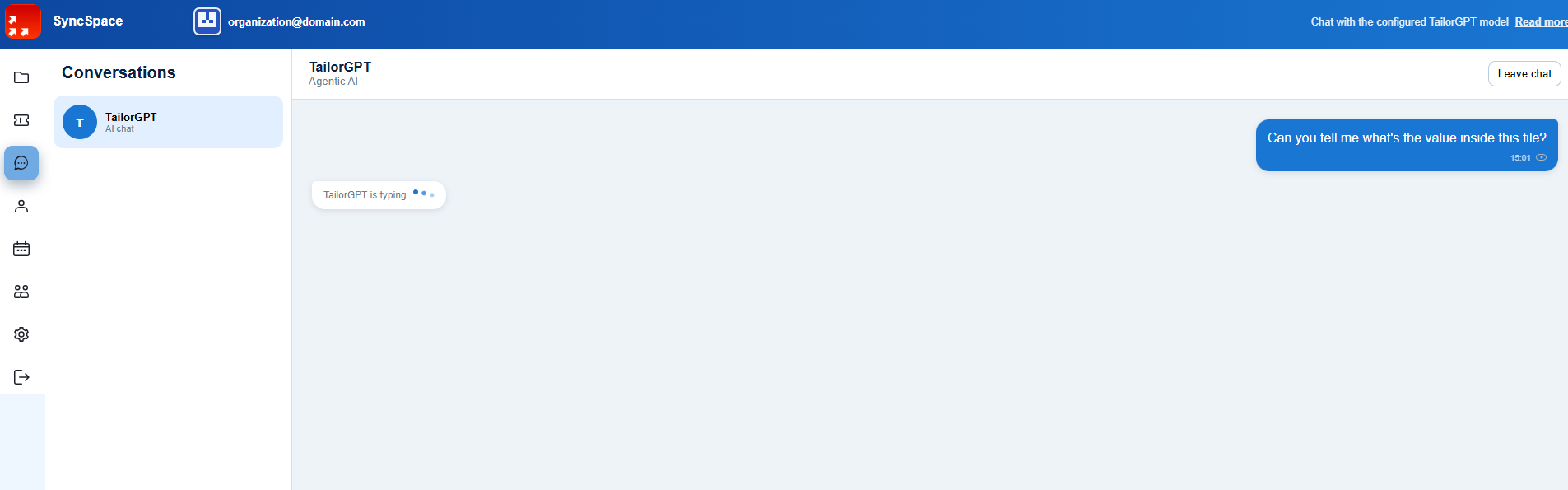
Ask TailorBOT questions about the document you selected
After a file is sent to TailorBOT, the chat opens with that document as context. You can ask for a value, a summary, dates, names or other information without copying the document into a separate AI service.
04
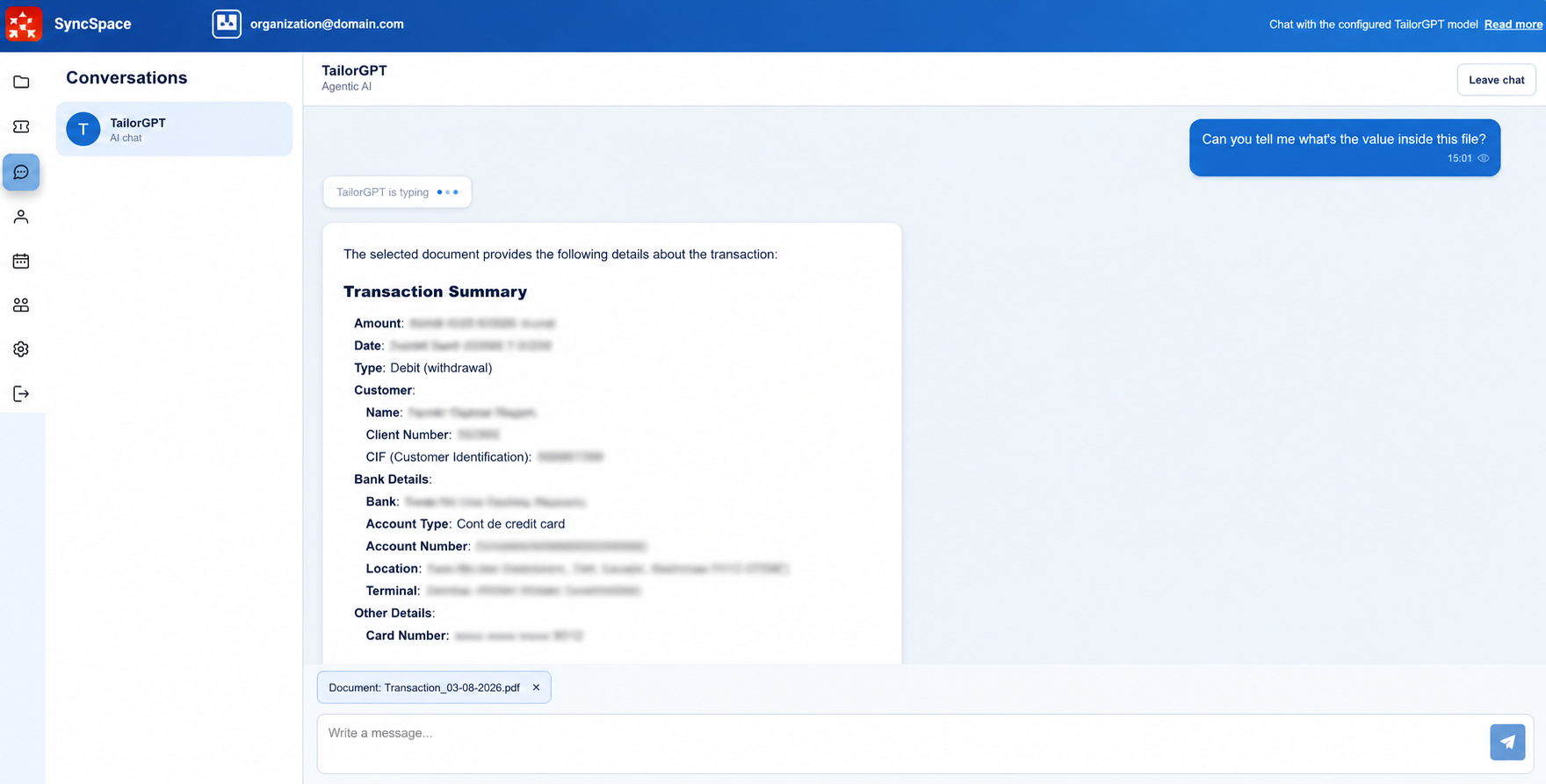
Turn an uploaded document into usable information
TailorBOT can return a structured answer from the selected file—for example an amount, date, transaction type, customer details, account information or other fields contained in the document. This is useful when staff need the information inside a document, not just a place to store the PDF.
05
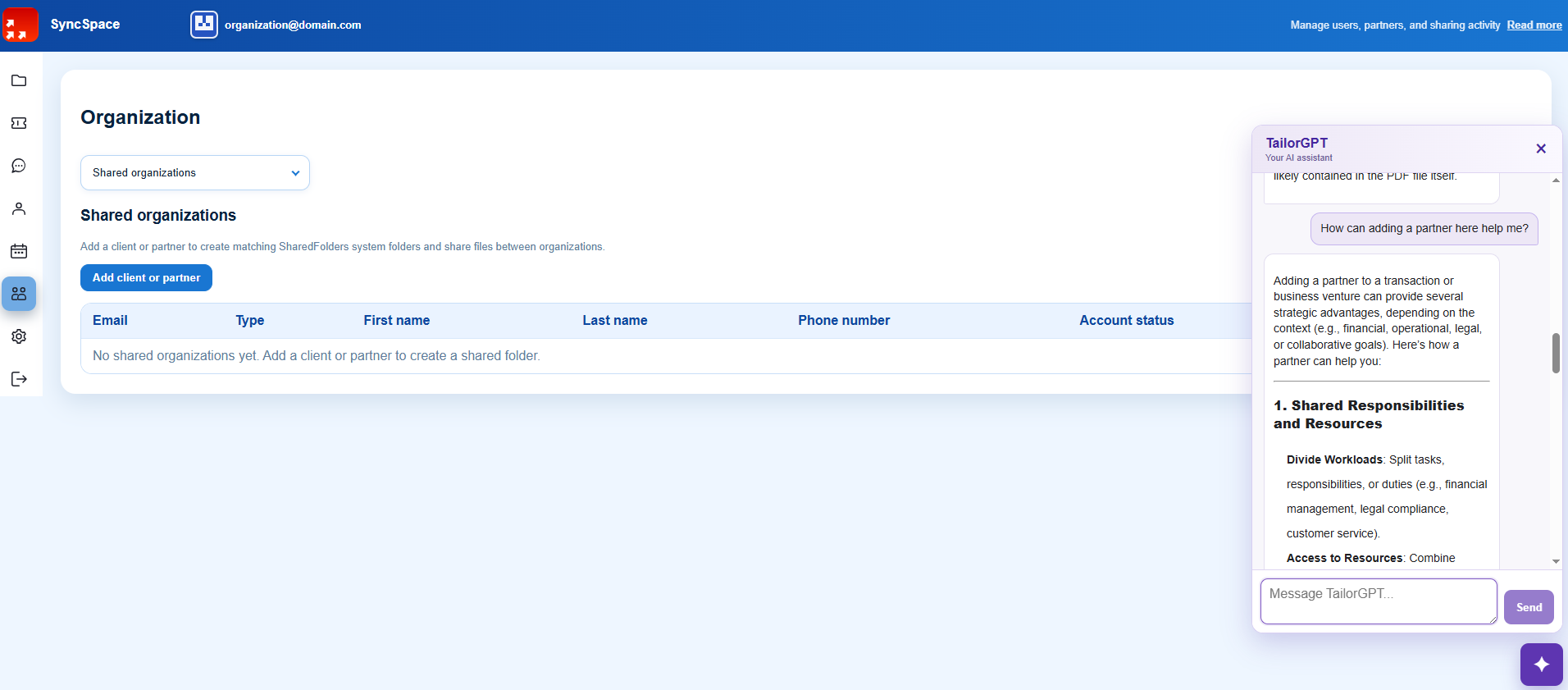
Create a shared space for each client or partner
Add a client or partner as a shared organization and SyncSpace creates the structure used to exchange files between the two organizations. This gives external collaborators a defined place for shared documents instead of spreading files across email threads and personal links.
TailorBOT remains available alongside the workspace, so users can ask questions while they are working with clients, partners and the documents shared with them.
06
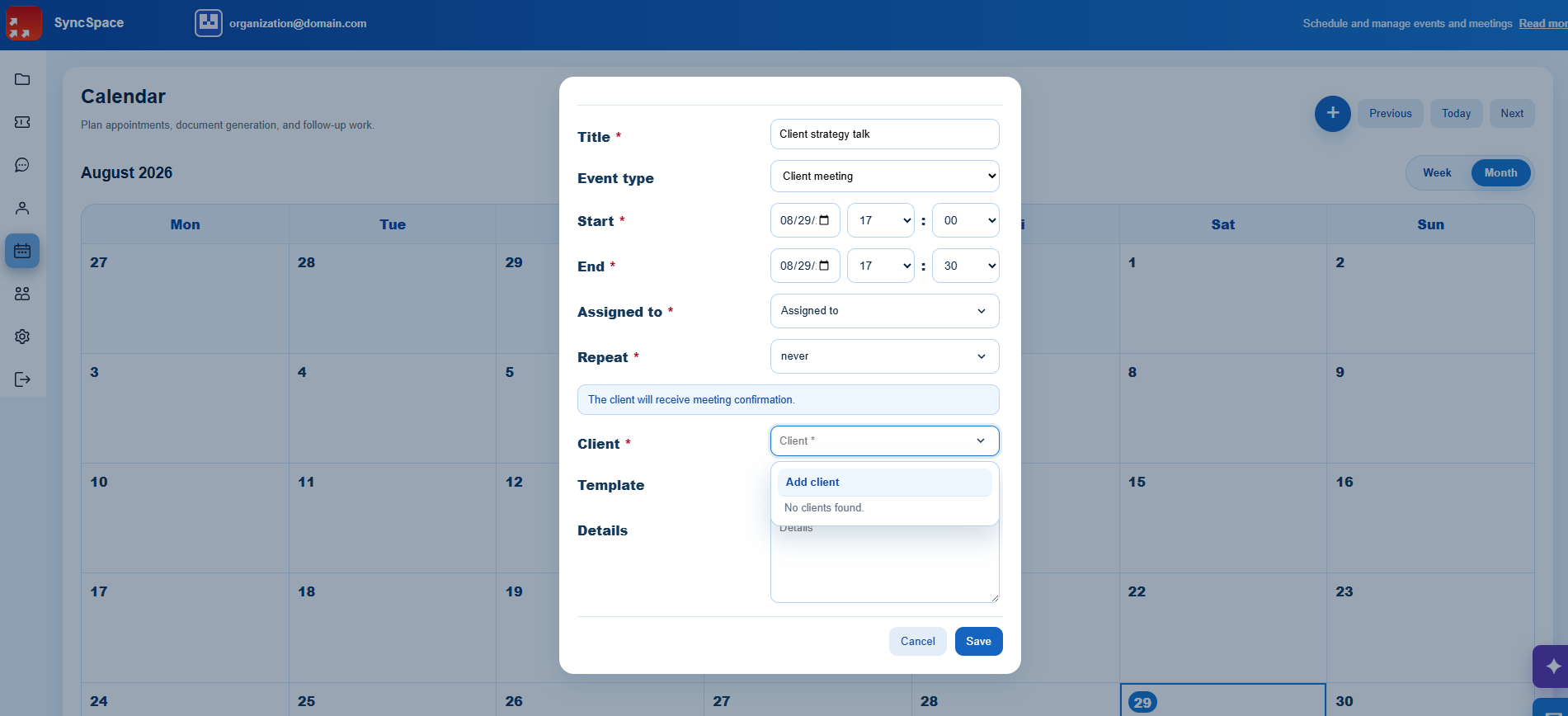
Schedule customer meetings and follow-up work
Create a calendar event, choose its type, start and end time, assignee, recurrence, client and template. For client meetings, SyncSpace can keep the appointment connected to the customer and send the meeting confirmation from the same application.
07
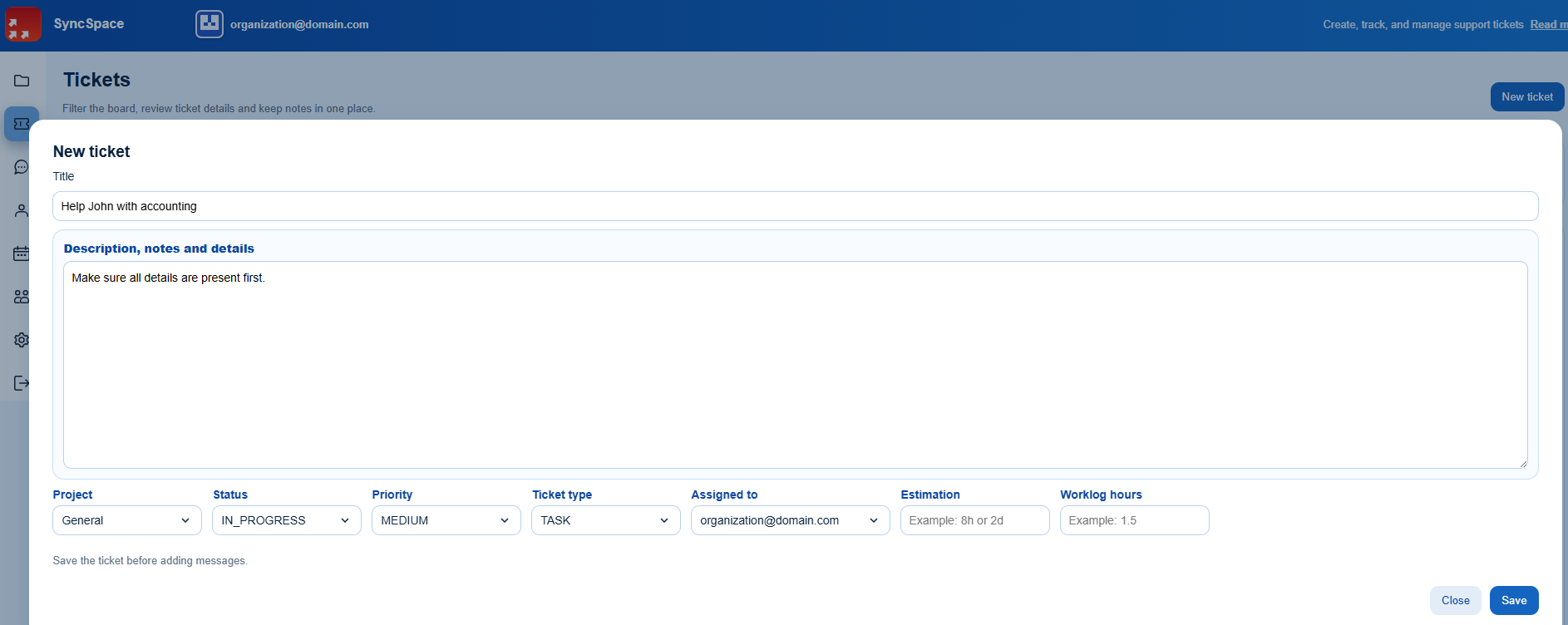
Turn follow-up work into an assigned ticket
Create a ticket with a clear title, detailed notes, project, status, priority, ticket type, assignee, estimate and logged hours. This gives small teams a practical way to move from a document or customer request to accountable work without introducing a separate heavyweight project-management system.
EXPLORE THE PRODUCT IN MORE DETAIL
File synchronization, EU hosting, duplicate cleanup and document AI.
The walkthrough above shows the day-to-day experience. These pages explain the underlying capabilities in more detail, including where files are hosted and how desktop synchronization works.
EU file storage
Store, synchronize and exchange business files with core service data hosted in Romania and Germany.
Read moreDesktop duplicate cleanup
Find, review and clean duplicate files from synchronized folders with the SyncSpace desktop application.
See duplicate cleanupBusiness file sync
Connect teams, clients, partners and suppliers through controlled folders across Windows, web, Android and server.
See file syncTailorBOT AI assistant
Use a custom large language model to read the files you select and answer questions in the context of your SyncSpace workspace.
Meet TailorBOTSYNCSPACE SUBSCRIPTIONS
Choose the plan that matches your storage and document-processing needs.
Prices are per month, per user, and shown in EUR. Storage, OCR and TailorBOT limits match the current SyncSpace application subscription catalogue.
Free
0 EUR/ month / user
Free starter plan for evaluation and light personal use.
- 500 MB storage
- 5 OCR files / month
- 5 TailorBOT file-processing actions / month
Limited
1 EUR/ month / user
Basic plan for individuals and small projects.
- 5 GB storage
- 10 OCR files / month
- 10 TailorBOT file-processing actions / month
Standard
3 EUR/ month / user
Standard plan for growing teams and regular collaboration.
- 15 GB storage
- 50 OCR files / month
- 50 TailorBOT file-processing actions / month
Premium
10 EUR/ month / user
Professional plan with advanced features and increased storage.
- 50 GB storage
- 200 OCR files / month
- 200 TailorBOT file-processing actions / month
Enterprise
Contact usCustom pricing
Enterprise deployment with greater control over where your company data and SyncSpace services run.
- All SyncSpace capabilities
- Dedicated infrastructure exclusively for your company, managed by CodingTailors
- Or deployment on your own servers / infrastructure
- Deployment, storage, backup and support terms tailored to your requirements
Subscription prices and limits are synchronized with the current application catalogue. Payment and invoicing terms are presented during subscription checkout.
BUILT AROUND HOW YOU WORK
One platform, several team profiles.
We group industries by workflow, so each company can immediately recognize how SyncSpace fits.
Office & professional teams
For accounting, legal, consulting, insurance and administrative offices that organize documents by client, case or project.
- Shared client and project folders
- Controlled access for employees and partners
- Deadlines and appointments in one dashboard
Field & operational teams
For construction, maintenance, logistics and warehouse teams connecting Windows office PCs with Android users in the field.
- Documents available where work happens
- A consistent structure between office and field
- Fewer files lost in chats or private devices
Branches & partner networks
For organizations with multiple locations, external collaborators or customers who need a simple way to exchange documents.
- Centralized company information
- Separate access by team or partner
- A repeatable workspace for every location
SOLUTIONS
Real workflows your team can handle in SyncSpace.
Start with the business problem, then see the SyncSpace capabilities used to solve it.
File synchronization
Keep working folders synchronized across authorized team devices and the server.
Client file sharing
Exchange files with clients, partners and suppliers through controlled accounts.
Appointments
Schedule customer meetings and send appointment information by email.
Ticketing
Assign internal work and track status, priority, estimates and time.
AI document search
Ask AI questions about selected company files and find relevant information inside document content.
CUSTOM DEVELOPMENT
When the standard product is not enough, we tailor the software.
CodingTailors designs integrations, document workflows, OCR extraction, electronic archives, customer portals and internal business applications around your existing processes.
Discuss your workflowDocument management
Organize, search, share and archive business documents.
OCR & data extraction
Turn scanned documents into structured information and automated actions.
Integrations & automation
Connect systems through APIs, imports and reliable backend services.
Long-term support
Maintain, secure and extend the solution as your organization changes.
ABOUT CODINGTAILORS
Practical software for real operational work.
We combine more than 15 years of software experience with a pragmatic understanding of business workflows in finance, insurance, banking, healthcare and document-heavy organizations.
Our goal is not to add complexity. It is to give teams a secure, maintainable system that reduces manual work and stays useful over time.
COMMON QUESTIONS
What teams ask about SyncSpace
What is SyncSpace?
SyncSpace is a secure workspace for companies, teams, clients, partners and suppliers, with file synchronization, shared folders, users, permissions and a shared calendar.
Which platforms does SyncSpace support?
SyncSpace is available for Windows, web and Android.
Where is the data hosted?
The standard SyncSpace service is hosted in the European Union on servers in Romania and Germany. Enterprise customers can also use dedicated infrastructure managed exclusively for their company or deploy SyncSpace on their own infrastructure.
Is SyncSpace suitable for businesses?
Yes. SyncSpace is designed for companies and teams that need a shared folder structure, access control and shared planning.
What is TailorBOT?
TailorBOT is the AI assistant built into SyncSpace. It uses a custom large language model to answer questions using the content of selected files.
LET'S TALK
Tell us how your team handles files and work today.
Write to suport@codingtailors.ro or call +40 733 428 132.